[Open Source] A multifunctional, highly efficient, low-code, full-stack, intelligent development tool

1. Project Overview
A feature-rich, high-efficiency, low-code, full-stack, intelligent development tool
mdp-sys-ui-webDesigned to provide enterprises with a template project for developing and managing business systems. This template project features high efficiency, low-code development, and rich functionality. Enterprises can add more business features to this project or use it as a template to create new projects for other business needs. When building applications with this project, you don't need to worry about issues such as multi-tenancy, login, unified authentication centers, permissions, menu management, system management, common components, public APIs, redundant code, data dictionaries, image libraries, file libraries, smart forms, workflows, microservice communication, global bug tracking and localization, multi-primary-key CRUD operations, or complex SQL queries. All these features are built in, making development effortless.
If you need just one reason to use MDP, it's this: significantly less code and development made so easy mdp-sys-ui-webAs an independent frontend project, enterprises can use this project separately and develop their own backend system, or use it directly.Mailman Team Uses the accompanying open-source backend system mdp-sys-backend as its backend service.
2. Open Source License
Licensed under MIT
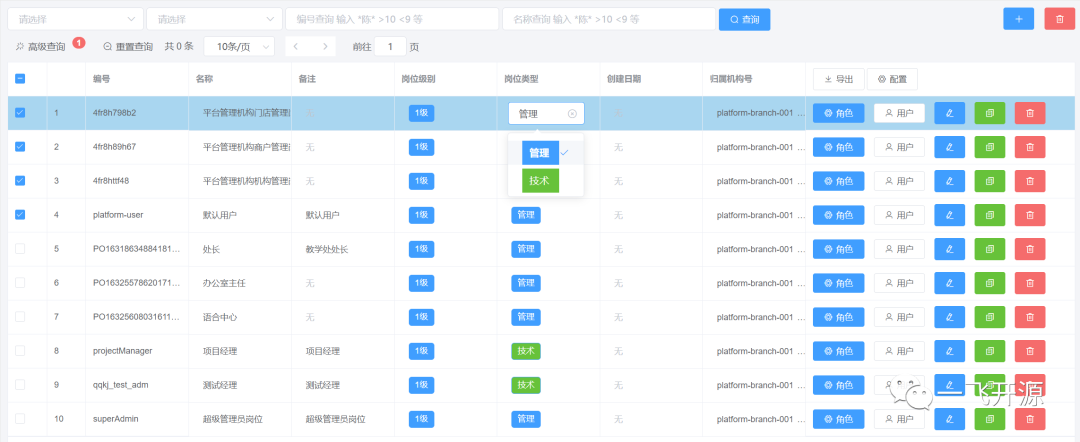
3. Screenshots



4. Feature Overview
Built-in Features
Role Permissions
  ├── Role Management                  => Role CRUD, menu assignment, permission assignment
  ├── Permission Definitions          => Permission CRUD
  ├── Menu Management                 => Menu (button) CRUD, assign menus (buttons) to roles
  ├── Module Management               => Module CRUD
  ├── Enabled Modules                 => View modules enabled by an organization (or individual)

Organization Management
  ├── Organization Management         => Maintain organization information, administrator information, account information, and organization products
  ├── User Management                 => User CRUD, assign positions, assign departments, reset passwords, send invitations
  ├── Department Management           => Department CRUD, assign positions to departments, view department users
  ├── Company Management              => Company CRUD (for super administrators)
  ├── Position Management             => Position CRUD, assign roles to positions, view personnel assigned to positions
  ├── Account Deletion Review         => Review user account deletion requests
Platform Management
  ├── Platform Configuration          => Configure platform information
  ├── Individual Verification Review  => Review individual real-name verification requests
  ├── Enterprise Verification Review => Review enterprise real-name verification requests
Metadata Management
  ├── Dictionary Management           => Data dictionary CRUD
  ├── List Maintenance                => CRUD for dropdown list items
  ├── Parameter Definitions           => CRUD for public system parameters
Approval Center
  ├── Pending Tasks                   => View and execute my pending tasks
  ├── Calendar Tasks                  => View and execute my pending tasks
  ├── Initiate Workflow               => Initiate a workflow
Approval Monitoring
  ├── Workflows I Initiated            => View workflows initiated by me
  ├── Workflows I Monitor              => View workflows I monitor and send reminders
  ├── Workflows I Participated In      => View workflows I have participated in
Workflow Models
  ├── Workflow Editor                 => Online workflow editor
  ├── Model Publishing                => Publish workflow models
  ├── Model Settings                  => Configure workflow associations with smart forms, model startup conditions, approvers, permissions, and more
Smart Forms (Low-Code)
  ├── Form Center                     => Smart form portal
  ├── Form Designer                   => Design smart forms and configure permissions
  ├── Data Entry and Query             => Query data already entered into forms
5. Tech Stack
⌨ Technology Stack
Vue ecosystem + Element UI + Axios
⚙ Quick Start
⚠️ Note: This project uses element-ui@2.3.0+, so the minimum compatible version is vue@2.5.0+
Preparation
- Your local environment needs to have Node.js and Git installed. Our technology stack is based on ES2015+, Vue, Vuex, Vue Router, and Element UI. Familiarizing yourself with these technologies in advance will greatly help you use this project.
- This project is a web-based frontend application. All APIs are provided by mdp-sys-backend. Please download this project.
- Download the code generator: mdp-code-generator
Component Library: mdp-ui
mdp provides dozens of encapsulated UI components. The difference between using and not using mdp-ui is like writing 1 line of code instead of 100 lines. The reduction in code volume is immediately noticeable.
- mdp-ui
- The core components of mdp. This component library consists entirely of frontend UI components and runs correctly without configuring any backend API interfaces.
- mdp-ui-ext
- Business components extended from mdp-ui, featuring business data loading capabilities through integration with backend APIs.
⚙ Quick Start
Find main.js and add the following code:
// mdp-ui basic components
import MdpComponents from '@/components/mdp-ui/index.js'
Vue.use(MdpComponents)

// Components extended by mdp-ui-ext
import MdpUiExtComponents from '@/components/mdp-ui-ext/index.js'
Vue.use(MdpUiExtComponents)

// Public API
import mdp from "@/api/mdp_pub";
Vue.prototype.$mdp = mdp;
Open-source projects extended from the mdp framework
⚠️ Note: The following framework extensions and subsystems have been extracted and summarized by the mdp open-source team based on project experience. They are optional and can be integrated into existing projects as JAR packages for deployment, or deployed independently as standalone applications or microservices.
- Third-party payment framework integrating WeChat Pay, Alipay, and PayPal.
- mdp-tpa-pay-backend Backend
- Instant Messaging Framework
- mdp-im-uniapp Frontend App
- mdp-im-web Frontend Browser
- mdp-im-backend Backend
- Unified Authentication Center Framework
- mdp-sys-ui-web Frontend
- mdp-oauth2-backend Backend
- mdp-sys-backend Backend
- Microservice framework
- mdp-cloud-backend Backend
- Workflow Management Subsystem
- mdp-workflow-ui-web Frontend
- mdp-workflow-backend Backend
- Smart Form Subsystem
- mdp-form-ui-web Frontend
- mdp-form-backend Backend
- Content Management Subsystem
- mdp-arc-ui-web Frontend
- mdp-arc-backend Backend
- SMS Subsystem
- mdp-sms-ui-web Frontend
- mdp-sms-backend Backend
- Project Management Subsystem
- xm-crowd-ui-web Crowdsourcing Frontend
- xm-ui-web Frontend Administration
- xm-backend Backend
- Financial Management Subsystem
- ac-core-ui-web Frontend Administration
- ac-backend Backend
For more information, please refer to the README.md documentation.