[Open Source] A lightweight and secure survey system providing product-grade solutions for online research scenarios

1. Project Overview
Build Your Own Survey System Quickly and Easily, Making Research More Convenient
XIAOJUSURVEY is a lightweight and secure survey system that provides an all-in-one, product-grade solution for individuals and businesses, quickly meeting the needs of various online survey scenarios.
The system includes more than 40 question types and over 100 carefully selected templates, making it suitable for a wide range of scenarios, including market research, customer satisfaction surveys, online examinations, voting, reporting, and assessments. In terms of data capabilities, the system has been refined through processing hundreds of millions of data records and provides online reporting features such as question-level statistics, cross-analysis, and multi-channel analysis, quickly meeting professional analytical requirements.
2. Open Source License
Licensed under Apache-2.0
3. Screenshots
Function introduction
Question Type Overview
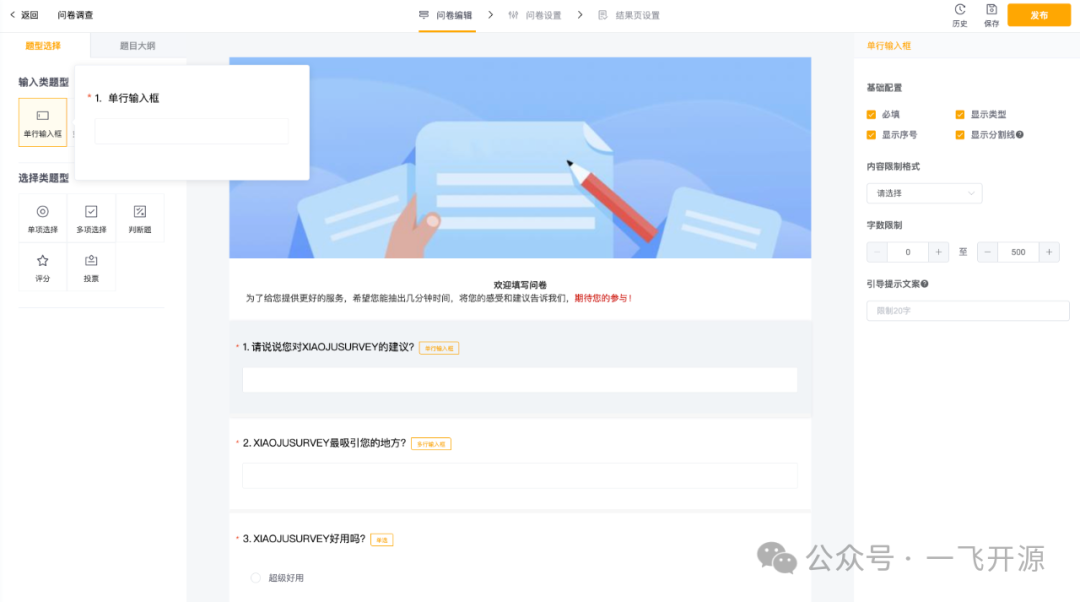
Single-Line Input Field
There are two types of input fields: single-line and multi-line. By default, the input length is limited to 500 characters, but the minimum and maximum character limits can be freely configured. You can switch between the two input field types at any time. The interface is shown below:
Multi-Line Input Field
There are two types of input fields: single-line and multi-line. By default, the input length is limited to 500 characters, but the minimum and maximum character limits can be freely configured. You can switch between the two input field types at any time. The interface is shown below:

Single-Choice Question
Supports both horizontal and vertical layouts, along with many advanced option configurations:
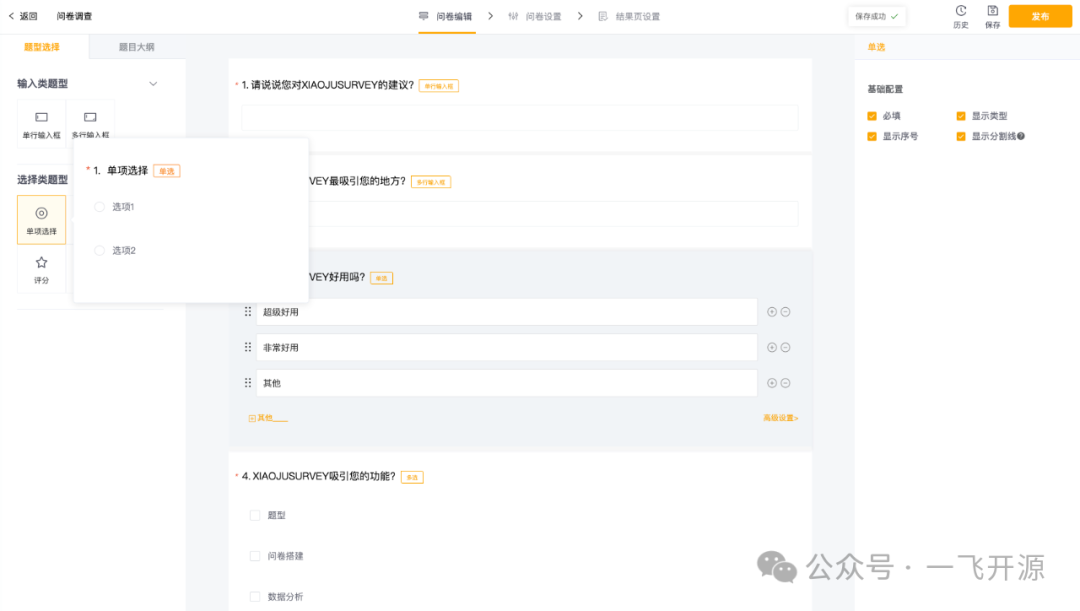
Let's take a closer look at these features.
Question Subtypes
Supports switching directly between single-choice and multiple-choice questions, as well as changing the option layout.
Unconditional Skip Logic
After a specific question is selected, respondents will be redirected to the designated question regardless of their answer. If unconditional skip logic is configured, option-based skip logic cannot be configured.
Option Configuration
-
Option Text: The text displayed for an option.
-
Option Image: Supports displaying options as images, which can be uploaded directly.
-
Selection Limit: The maximum number of times this option can be selected.
-
Add an Input Field After an Option: When enabled, an input field appears below the option. This is commonly used for an "Other" option, allowing respondents to enter their own answers.
Advanced Settings
-
Select the First Option by Default
-
Randomize Option Order: Displays the question options in a randomized order.
Note: After enabling randomization, you can select "Do Not Randomize" next to specific options that should retain their original positions.
Multiple-Choice Question
Multiple-choice questions are displayed as shown below. Like single-choice questions, they support both horizontal and vertical layouts.
The configuration of multiple-choice questions is very similar to that of single-choice questions. Here are the main differences.
Option Configuration
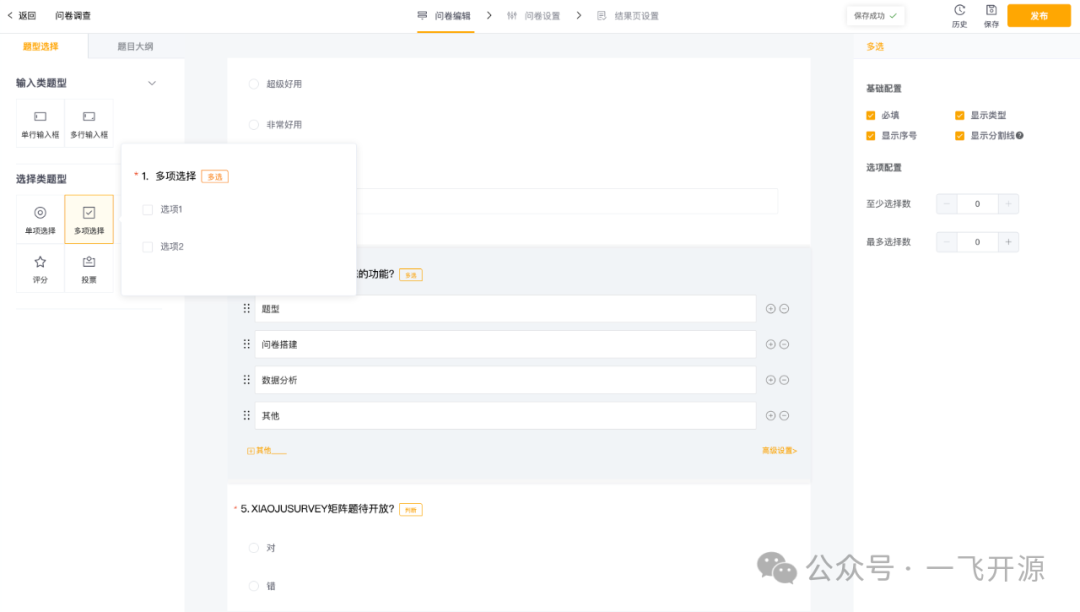
Multiple-choice questions support mutually exclusive options. For example, suppose there are three options: A, B, and C, and option A is configured as mutually exclusive. If a respondent selects A and then selects B, A will automatically be deselected. Multiple-choice questions also support minimum and maximum selection limits. If a respondent's selections do not meet these requirements, an error message is displayed immediately.
True/False Question
True/false questions have two default options: True and False. Additional options cannot be added. The result is shown below:

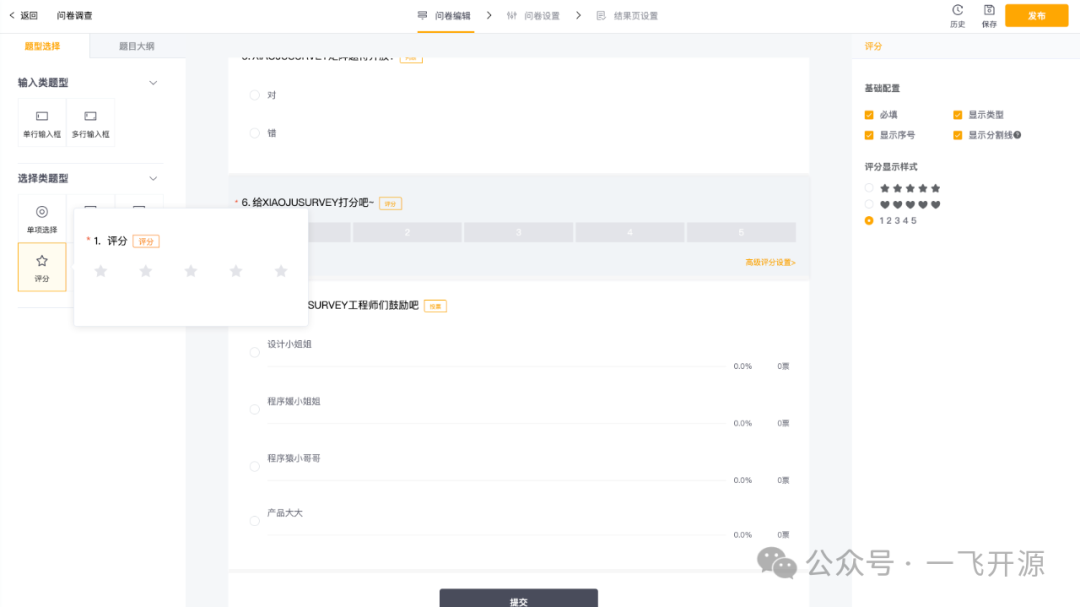
Rate
Users can rate items using a star-based rating system. The result is shown below:
Voting Question
Voting question configuration is similar to that of single-choice questions, but the display is different. Each option shows how many people have selected it and the corresponding percentage.
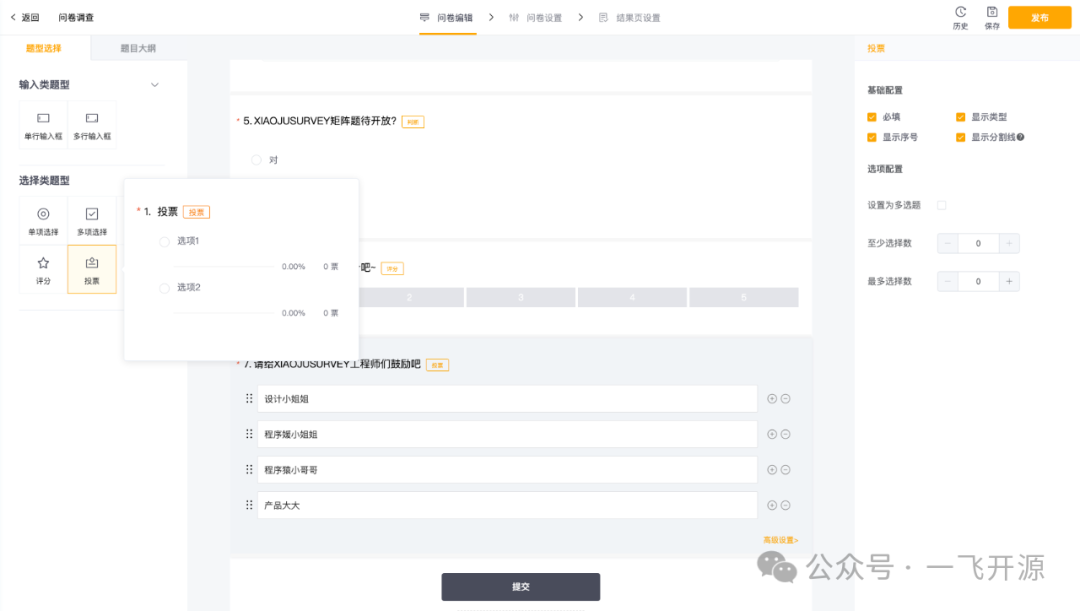
If you do not want voting results to be displayed in real time, go to Settings → Voting Configuration and choose whether to display results after submission.
(More question types and advanced question features will be released progressively...)
4. Feature Overview
This open-source release primarily focuses on providing complete product-level capabilities throughout the survey lifecycle:
-
Survey Management: Create, edit, distribute, collect responses, and analyze data
-
Diverse Question Types: Single-line input, multi-line input, single-choice, multiple-choice, true/false, rating, and voting
-
(More question types will be released progressively, along with quick custom question type creation.)
-
User Management: Login, registration, and permission management
-
Data Security: Encrypted transmission, data desensitization, and more
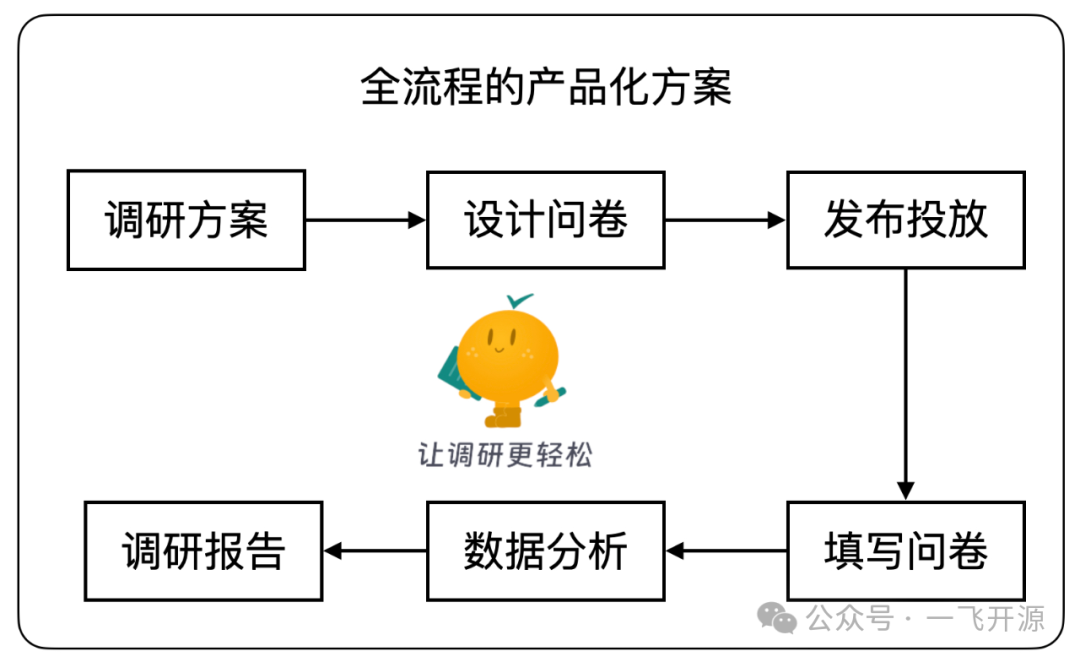
(Both individuals and businesses can quickly build survey solutions tailored to specific industries and business domains.)
Project Advantages
1. Comprehensive and Professional Capabilities
-
Established Standardized Survey Protocol Specifications
-
Domain standards ensure consistent terminology and interoperability, forming the foundation and core of the entire system. Based on practical business experience, two major categories have been established:
-
Business Definitions: Survey protocols and question type protocols
-
Component Definitions: Question type component protocols, including question types and their configuration panels
-
Established Survey UI/UX Standards
-
Design language is the foundation of system flexibility and consistency, ensuring an excellent user experience throughout actual business operations supported by the system. It consists of two parts:
-
Design Standards: Flexibility, reduced visual clutter, and consistency
-
Interaction Standards: Following user behavior patterns, product positioning, and established user habits
-
What You See Is What You Get, with Highly Consistent Builder and Rendering Experiences
-
Actual business usage includes survey creation and distribution, corresponding to the system's builder and rendering interfaces. We designed question types around real-world scenarios to ensure a highly consistent experience throughout the entire survey lifecycle, from creation and preparation to distribution and use.
-
Component-Based Question Type Design for Flexible Customization and Extension
-
Question types are the most fundamental components of a survey. Their configurability determines the range of business scenarios that can be extended at the application level and the degree to which the system itself can be reused. The question type architecture is designed so that each category provides common foundational capabilities, while every question type offers its own atomic functional features, ensuring extensive customization capabilities.
-
Accumulated Compliance Standards and Highly Extensible Security Capabilities
-
Features such as encrypted data transmission, fine-grained sensitive information detection, and anti-fraud protection for voting help ensure the security of survey publishing and data collection workflows.
2. Lightweight Design for Rapid Integration and Flexible Extension
-
A Product-Grade Open-Source Solution for Quickly Building a Complete Survey Workflow
-
Provides comprehensive product-level capabilities throughout the survey lifecycle, including user management (login, registration, and survey permissions) and survey management (creation, editing, distribution, response collection, and data analysis), enabling the rapid development of survey solutions for specific industries and business domains.
-
Ready-to-Use Survey Design That Reduces Domain Complexity
-
Surveys are highly flexible in structure, which introduces considerable complexity in survey editing capabilities. We have divided survey editing into five major subdomains to organize product capabilities while guiding the system's modular design and development. Through module orchestration and management, the system is ready to use out of the box.
-
Low Custom Development Costs, Easily Build Your Own Survey System
-
The entire system follows design principles based on protocol standardization, functional modularization, and configurable management. It also provides a comprehensive set of documentation, development guides, and extension manuals.
-
Low Deployment Costs, Get Started Quickly
-
Frontend-backend separation with Docker-based deployment solutions and comprehensive deployment guides.
5. Tech Stack
Technology
Web Client: Vue2 (Vue3 version scheduled for release in the first half of 2024) + ElementUI
Server: Nestjs + MongoDB
Architecture
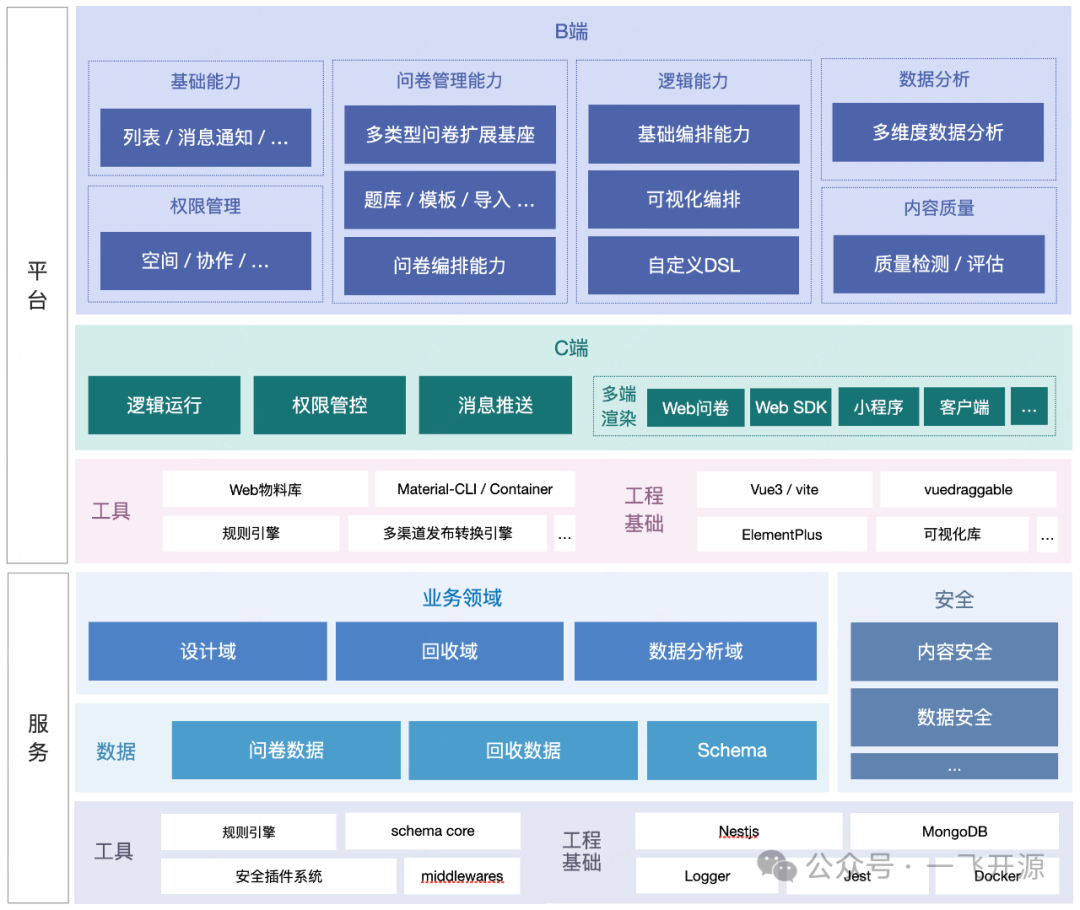
The ultimate purpose of architecture design is to enable rapid expansion into different scenarios. Built on a solid engineering foundation, users can focus on deeper development within their business domains.
B2B: Designed for survey administrators, focusing on three core capabilities: survey management, survey distribution, and data analysis. (In actual scenarios, additional capabilities such as sample management and channel management may also need to be developed.)
B2C: Designed for survey respondents, focusing on three core capabilities: multi-platform rendering, runtime management, and permission control. (Multi-platform support means surveys can run independently or be embedded in applications across PC, H5, APP, and Mini Program platforms.)
Server: Focuses on API development, security capabilities, and data asset management.
Furthermore, the entire system also focuses on integration with other enterprise systems through capabilities such as embedded applications and custom push notifications.
Quick Startup
Node version >= 16.x, see the Environment Preparation Guide
Clone the Project
Start the Server
Option 1: Quick Start Without Installing a Database
Suitable for quickly previewing the project. For production projects, use Option 2.
1. Install dependencies
2. Start the application
The service depends on mongodb-memory-server:
1. Data is stored in memory. Restarting the service will reset the data.
2. When starting a new in-memory server instance, if the MongoDB binary files cannot be found, they will be downloaded automatically. Therefore, the first startup may take some time.
Option 2: (Recommended for Production)
1. Start the Database
The project uses MongoDB: MongoDB Installation Guide
Start and configure the database. See Starting MongoDB.
2. Install Dependencies
3. Start the Project
Frontend Startup
Install Dependencies
Start
Access
Survey Management Interface
http://localhost:8080/management
Survey Distribution Interface
Create and publish surveys.
http://localhost:8080/render/:surveyPath